

Answer in brief
Agentic recruiting guide for recruitment teams: which hiring steps AI agents can run, where human checkpoints belong, and what audit logs must record.
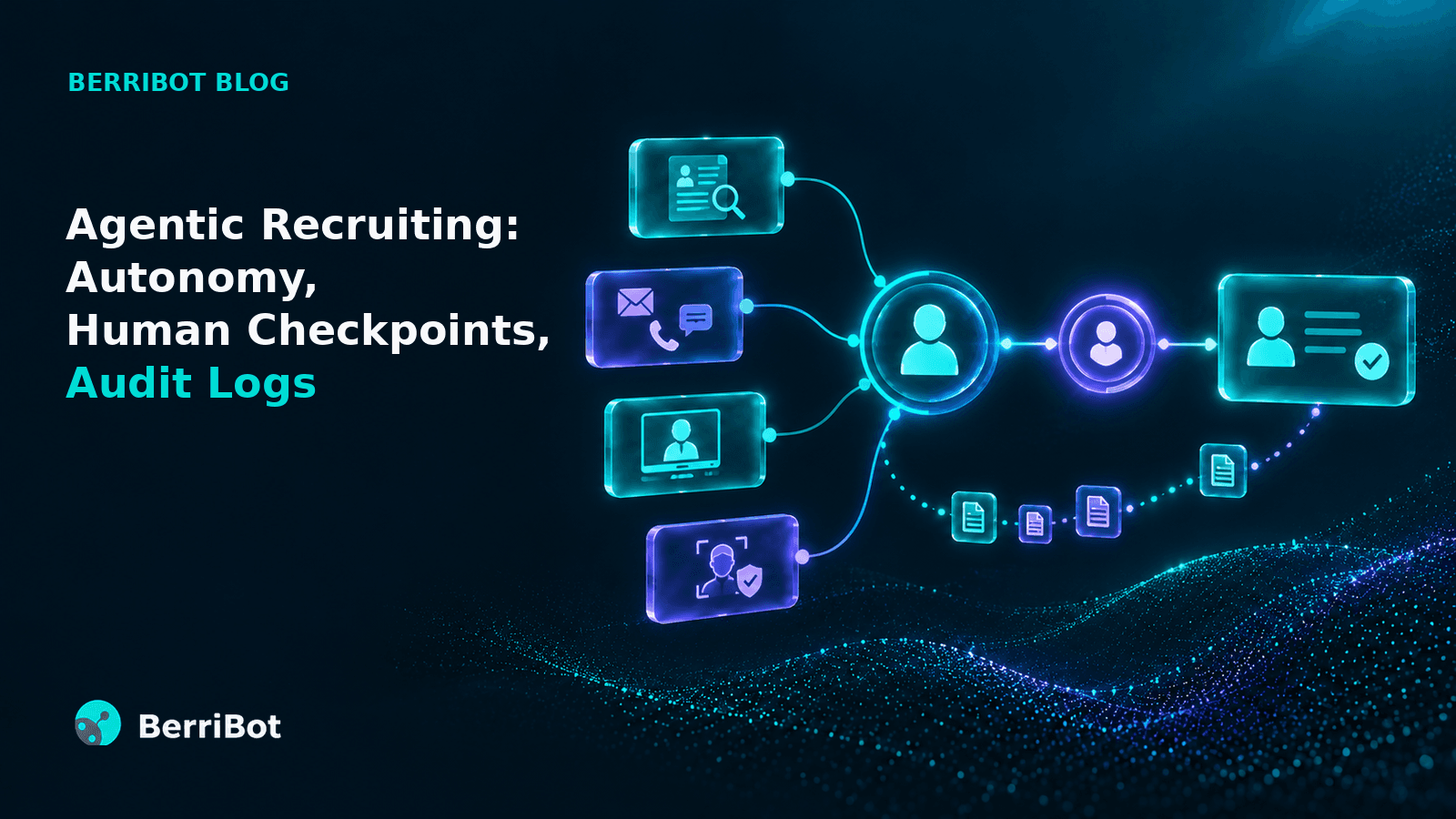
In agentic recruiting, multiple AI agents work together to complete hiring steps, such as scheduling interviews, without waiting for a person. A human checkpoint is where your team makes high-stakes decisions like rejections and offers. The audit log records every action from both, so you can later show who did what and why. Because most recruiting vendors now call their products agentic, the label alone tells you little.
This guide covers which hiring steps AI agents can run on their own, where your team should decide, what a useful audit log contains, what the law expects, and what to ask in a vendor demo.
What Is Agentic Recruiting, and What Makes a Recruiting Tool Agentic?
Agentic recruiting is the use of a platform with multiple AI agents, each handling a dedicated hiring task, to move candidates through the recruitment process within rules the recruitment team sets. An AI agent finishes its task and passes the candidate to the next step without recruiter intervention, and that is what separates it from tools that wait for a trigger or a person to act.
Three kinds of tools often share the same label in sales decks:
Type of tool | What it does | Example in hiring |
Rule-based automation | Runs one fixed action when a recruiter triggers it | Sends a status email when a recruiter moves a candidate |
AI assistant | Suggests or drafts something, then waits for a person to act | Drafts outreach messages for a recruiter to review and send |
AI agent | Plans, reasons and carries out its task, then moves the candidate to the next step | Calls a shortlisted candidate, books the interview and runs the first round |
The term “agentic” is used loosely. In June 2025, Gartner estimated that only about 130 of the thousands of vendors marketing agentic AI offer real agentic capability. It called the practice of rebranding chatbots and assistants as agents “agent washing.”
For a buyer, three specific questions matter more than whether a tool calls itself agentic:
Which hiring stages can it run on its own, without a human trigger?
Who approves the agents’ recommendations at each stage?
Where is the record of each action kept?
Answering the first question starts with a map of each hiring stage.
Which Recruiting Steps Can AI Recruiting Agents Run on Their Own, and Which Need Human Approval?
AI recruiting agents can run high-volume, routine steps such as resume screening, outreach, scheduling and first-round interviews. Steps that change a candidate’s status, such as rejections, advancement on an interview score and offers, should wait for human approval.
This table maps each stage of a typical first-round hiring process:
Hiring stage | What an agent can do on its own | Where a human should approve |
Resume screening and ranking | Read resumes against the job description, rank candidates and sort them into fit bands | Recruiters review the screening results and the reasoning behind each ranking, and override it if needed |
Outreach and scheduling | Call and message candidates, book and reschedule interviews, send reminders and answer questions | Up front, when the team sets the channels and what the agent can share with candidates |
First-round interview | Conduct the interview and score it against a fixed rubric | Before a candidate is advanced or rejected on the interview score |
Interview integrity checks | Monitor the interview and flag suspected impersonation or proxy attempts with evidence | Before any action is taken on a flag |
Offer and post-offer | Follow up on offer acceptance and collect verification documents | Before an offer is issued |
Teams new to agentic AI recruitment software often start with more checkpoints and remove them as they build trust in the agents’ results. If your recruitment team rarely changes an agent’s result at a checkpoint, that checkpoint can become a spot check. If the team changes it often, adjust the criteria before removing the checkpoint. How each checkpoint is set up decides how much value your team gets from it.
How Should You Set Up Human Checkpoints in an Agentic Recruiting Workflow?
Set human checkpoints at decisions that move a candidate forward or out of the hiring process, show the reviewer the evidence behind the agent’s result, and record every approval or override in the audit log.
Recruitment teams can combine three kinds of checkpoint:
1. Approval Before Action
The agent recommends a decision, such as rejecting or advancing a candidate, and a recruiter approves it before it takes effect. Use this for any decision your company policy reserves for a recruiter or hiring manager.
2. Score Thresholds
Candidates above an agreed score move forward automatically, and those in a middle band wait for review. No candidate is rejected until your recruitment team has reviewed them.
3. Review on Flag
When the agent spots a possible issue, such as a suspected proxy interviewee, it raises a flag. Your recruitment team reviews the evidence and makes a decision.
Checkpoints can also differ by hiring campaign. In a campus drive with thousands of applicants, score thresholds can move most candidates forward automatically. For a senior engineering role with fewer applicants, recruiters may prefer to review every shortlisted candidate themselves.
Recruiters make better decisions at a checkpoint when they can see the reasons behind each score, such as the criteria a resume matched. Article 14 of the EU AI Act sets the same expectation for high-risk AI: the people overseeing a system should be able to understand its output and stay aware of the tendency to over-rely on it. Each of those informed decisions then becomes part of the record.
What Should an Audit Log in Agentic AI Recruitment Software Record?
An audit log in agentic AI recruitment software should record every action an agent or a team member takes on a candidate. Each entry should show who acted, the time, the criteria used, and the result with its reasoning. The team should be able to find and export that record when an auditor, regulator or candidate asks how a decision was reached.
A complete log entry includes:
The actor, named as a specific agent or a specific user
The action, such as “interview scored” or “moved to panel round”
The candidate and the role
The date and time
The criteria in force, such as the job description or rubric version
The result and the reasons behind it
Any human approval or override, and who made it
Linked evidence, such as an interview transcript or a flagged screenshot
Where the log lives matters too. Some records stay inside the AI recruiting platform, while others write back to the ATS. When a recruitment audit trail is split across two systems, it takes longer to answer a candidate’s or regulator’s question.
Access and retention complete the setup. Only the right people should see each record, corrections should be added as new entries instead of overwriting old ones, and records should be kept as long as the law requires. Those legal requirements are becoming more specific.
Do AI Hiring Compliance Rules Require Human Oversight and Audit Logs?
It depends on where you hire. The EU requires both, US rules vary by state, and India’s data protection law governs the candidate data that AI hiring tools use.
In the EU, under the EU AI Act, AI systems used to filter applications and evaluate candidates are listed as high-risk in Annex III. Article 26 sets the duties of companies that use these systems. They must assign oversight to people with the competence, training and authority to carry it out, and keep the logs the system generates automatically for at least six months, where those logs are under their control. These obligations apply from December 2, 2027.
In the US, AI hiring compliance depends on state and local law, and more states are adding rules. SHRM reports that as of February 2026, 19 of the most populous states had enacted AI laws or regulations affecting employment decisions, yet 57% of HR professionals in those states were unaware of them.
In India, no law is specific to AI in hiring. The Digital Personal Data Protection (DPDP) Act, 2023 doesn’t require human oversight or audit logs, but it does govern how AI hiring tools collect, protect and delete candidate data, with most obligations applying from May 2027.
Clear checkpoints and complete logs let a company show how each hiring decision was made, wherever it hires.
This section is general information, not legal advice; your legal team can confirm which rules apply where you hire.
How Does Berri 360 Handle Autonomy, Human Checkpoints, and Audit Logs?
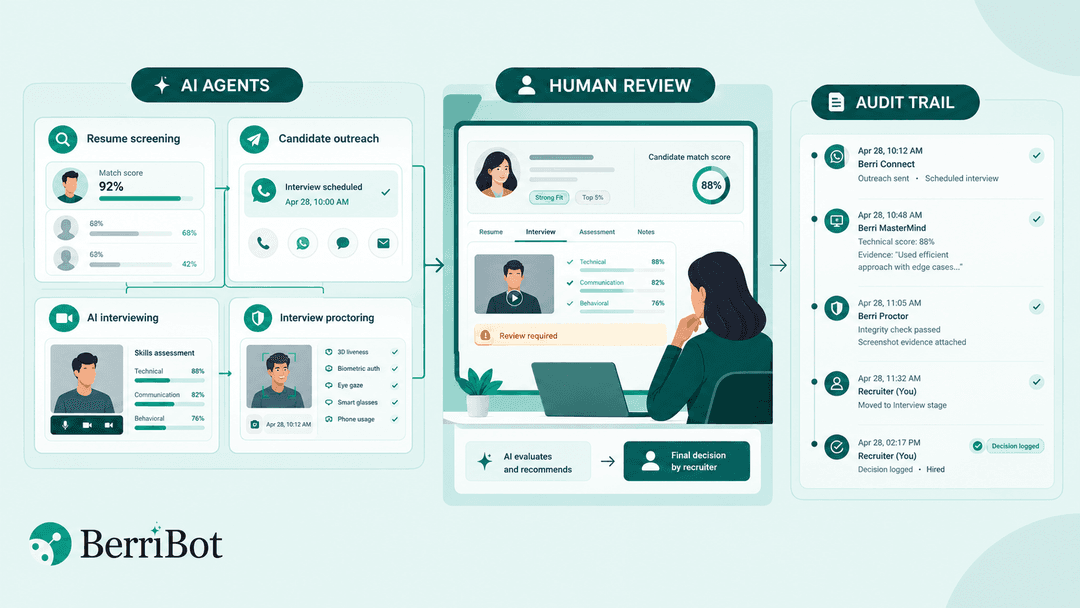
Berri 360 is Berribot’s agentic recruitment platform, where four AI agents work together to move candidates from resume screening through onboarding. The AI agents evaluate candidates and recommend top talent, and hiring managers make the final hiring decisions.
Which Hiring Steps Does Berri 360 Run on Its Own?
Berri 360 handles resume screening, candidate outreach, interview scheduling, AI-led interviews, interview proctoring, and candidate communication through onboarding. Its dedicated AI agents work 24/7 to handle these hiring stages:
1. Berri Search & Match screens resumes contextually against the job description and sorts candidates into Strong Fit, Neutral or Not Recommended. Each candidate also gets a Match Ranking Index (MRI), one explainable score per candidate per role that recruiters can overrule.
2. Berri Connect reaches shortlisted candidates through voice calls, WhatsApp, SMS and email. It asks screening questions, checks availability, schedules interviews, and sends invites and reminders to improve interview show-up rates.
3. Berri MasterMind conducts first-round technical interviews and scores every candidate on technical, communication and behavioral skills against one rubric per role. It supports coding assessments in 50+ programming languages and evaluates how well the code is written, not just the output.
4. Berri Proctor monitors MasterMind interviews in the background and flags impersonation and proxy interviews with timestamped screenshot evidence. Its detection layers include 3D liveness, which confirms a real person is on camera rather than a recording or a deepfake, along with biometric authentication, smart glass detection, eye gaze tracking and mobile phone usage detection.
Berri 360’s AI agents work at high volume. Berri Connect can initiate 10,000+ calls a minute, Berri MasterMind can conduct 20,000+ interviews a day, and companies automating recruitment with Berribot report cutting time to offer from 25+ days to 10.
Where Do Recruiters Make Decisions in Berri 360?
Recruiters set the score thresholds for each campaign and can advance or close any candidate at any time by dragging them to a different stage on the live pipeline board. Your recruitment team reviews every integrity flag before it affects a candidate, and a human reviews before any adverse decision.
What Does Berri 360 Log, and Where Do the Records Live?
Every manual move on the pipeline board is logged with the name of the person who made it. Every score keeps its reasoning, with the interview transcript quoted under each score, and each interview has a full audit trail.
Screening, outreach, interviews and integrity checks share one candidate record, and Berri 360’s native Workday and SuccessFactors integrations send scores and reports back to the ATS, which stays the system of record. Access is role-based, so each user sees only what their role requires.
The best way to judge any agentic recruiting platform is to test it on your own roles. Book a Berri 360 demo to see the agents work on a job description you bring.
What Should You Ask Vendors to Verify Autonomy and Audit Logs in Agentic Recruiting?
Ask each vendor to run one of your own roles and show you the reasoning behind an agent’s result, a checkpoint switched on and off, a recruiter override, and the full record for one candidate. A demo built on sample data won’t show how an AI recruiting platform handles your job descriptions and candidates.
Use this checklist in a demo or proof of value:
Show the reasoning and audit trail behind one agent’s result, such as an interview score.
Turn a checkpoint on and run a candidate through, then turn it off and run another.
Simulate a failed step, such as a no-show or an unanswered call, and show how it’s handled.
Override an agent’s result and show the record of who changed it.
Pull the complete history for one candidate, from screening to the last action.
Show which records stay in the vendor’s platform, which write back to your ATS, and who can see each.
Ask how long each type of record is kept and how it is deleted.
To run this checklist on Berri 360, start with a free Berri 360 pilot: one job family, 200 to 500 interviews, no fee and no contract.
Frequently Asked Questions
1. What Is Meant by Agentic?
Agentic describes AI that takes actions toward a goal on its own instead of only making suggestions. In recruiting, for example, Berri 360 is an agentic system that can screen resumes, communicate with candidates, and schedule, conduct and monitor interviews to recommend verified candidates.
2. Which AI Is Best for Recruitment?
The best AI for recruitment depends on your needs. For high-volume, end-to-end recruitment automation, Berri 360 is the best choice. It’s used by 8 of the 10 largest IT services companies to run first-round interviews.
Try Berri 360 on your own roles: book a demo

Ask us the questions the demo hides
Uptime, real completion rates, ATS write-back, certifications, references, a live pilot.
Start a pilot